Turn any text into high-quality audio with 29+ AI voices, 22+ languages, and intelligent document analysis. Perfect for content creators, audiobooks, educators, and accessibility advocates.Transform any text into professional audio with 29+ AI voices. Free forever!
mysterious The old clock tower struck midnight, its heavy bronze chime echoing through the fog-shrouded streets. suspenseful Julian held his breath, pressing himself flat against the cold stone wall as a shadow detached itself from the alleyway ahead. tense Step by step, it drew closer...
Start listening to your content for free — no credit card required
AI Narrator is a free text-to-speech and read aloud tool that turns any Google Doc, PDF, Word file, or web page into natural-sounding audio with 29+ realistic AI voices in 22+ languages. Use it directly inside Google Docs, as a Chrome extension on any webpage, or through the Telegram bot — no credit card and no setup required.
Turn any Google Doc into professional audio narration with one click
Read any webpage aloud with natural AI voices
Convert text, documents and links to speech on the go
Add AI voiceovers to your Canva designs, videos, and presentations in seconds
Turn text into natural speech in seconds
Analyse, summarize and extract insights instantly

Choose the plan that works best for you. Free plan includes 5 narrations and 20,000 characters/month with URL/PDF/Word to Audio. Pro unlocks 100 narrations, 1,000,000 characters/month, Voice Cloning, downloads, and the full workspace.Start free, upgrade to Pro when you need more
AI Narrator is free no credit card required. Try the instant text-to-speech playground in your browser, or install the Google Docs add-on, Chrome extension, or Telegram bot, and turn your writing into professional AI audio in minutes.
Try every tool with a generous monthly allowance
Unlock voice cloning, downloads, and the full workspace
Select from 29+ professional AI voices, each optimized for different content types and audiencesChoose from professional male & female voices
Bright · Marketing, Explainers
Firm · News, Corporate Training
Youthful · Vlogs, Social Media
Breezy · Lifestyle, Travel Vlogs
Easy-going · Casual, Podcasts
Smooth · Meditation, ASMR
Perfect for educational content, storytelling, and professional presentations
Breathy · Audiobooks, Storytelling
Excitable · Sports, Gaming
Gravelly · Documentaries, Deep Narration
Energetic · Commercials, Promo
Conversational · Podcasts, Explainers
Authoritative · Documentaries, Audiobooks
Ideal for energetic content, educational materials, and corporate training
“AI Narrator में आपका स्वागत है, Google Docs के लिए सबसे उन्नत टेक्स्ट-टू-वॉइस रूपांतरण उपकरण। उच्च-गुणवत्ता वाली आवाज़ों के साथ अपने दस्तावेज़ों को पेशेवर ऑडियो में बदलें।”
“AI Narrator-এ স্বাগতম, Google Docs-এর জন্য সবচেয়ে উন্নত পাঠ্য-থেকে-ভয়েস রূপান্তর সরঞ্জাম। উচ্চ-মানের ভয়েস দিয়ে আপনার নথিগুলিকে পেশাদার অডিওতে রূপান্তর করুন।”
“欢迎使用 AI Narrator,这是适用于 Google Docs 的最先进的文本转语音工具。使用高质量的语音将您的文档转换为专业音频。”
“Willkommen bei AI Narrator, dem fortschrittlichsten Text-zu-Sprache-Tool für Google Docs. Verwandle deine Dokumente in professionelles Audio mit hochwertigen Stimmen.”
“Bienvenue sur AI Narrator, l'outil de synthèse vocale le plus avancé pour Google Docs. Transformez vos documents en audio professionnel avec des voix de haute qualité.”
Supports 22+ languages including English, Spanish, French, German, Hindi, Bengali, Chinese and more
All these voice options are available in the free version. Try different voices to find the perfect match for your content.
Download Free NowEverything you need to transform your written content into engaging audio experiencesPowerful AI voice generation & analysis
Content creators use AI Narrator to produce audiobooks and voiceovers, educators turn lesson plans into engaging listening material, and students study hands-free. Beyond reading text aloud, AI Narrator analyzes your document and gives step-by-step recommendations to improve clarity and impact.
Comprehensive analysis
Engagement insights
Writing style feedback
Step-by-step guidance
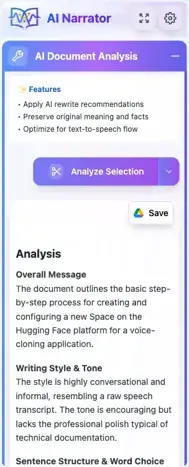
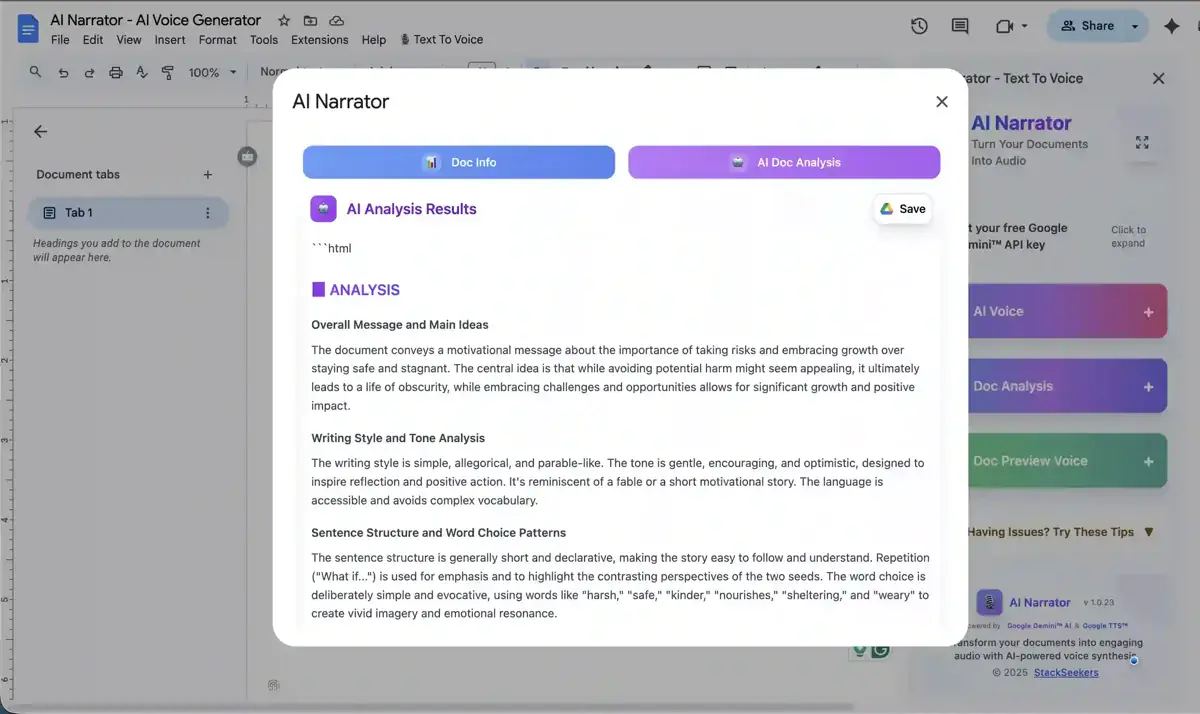
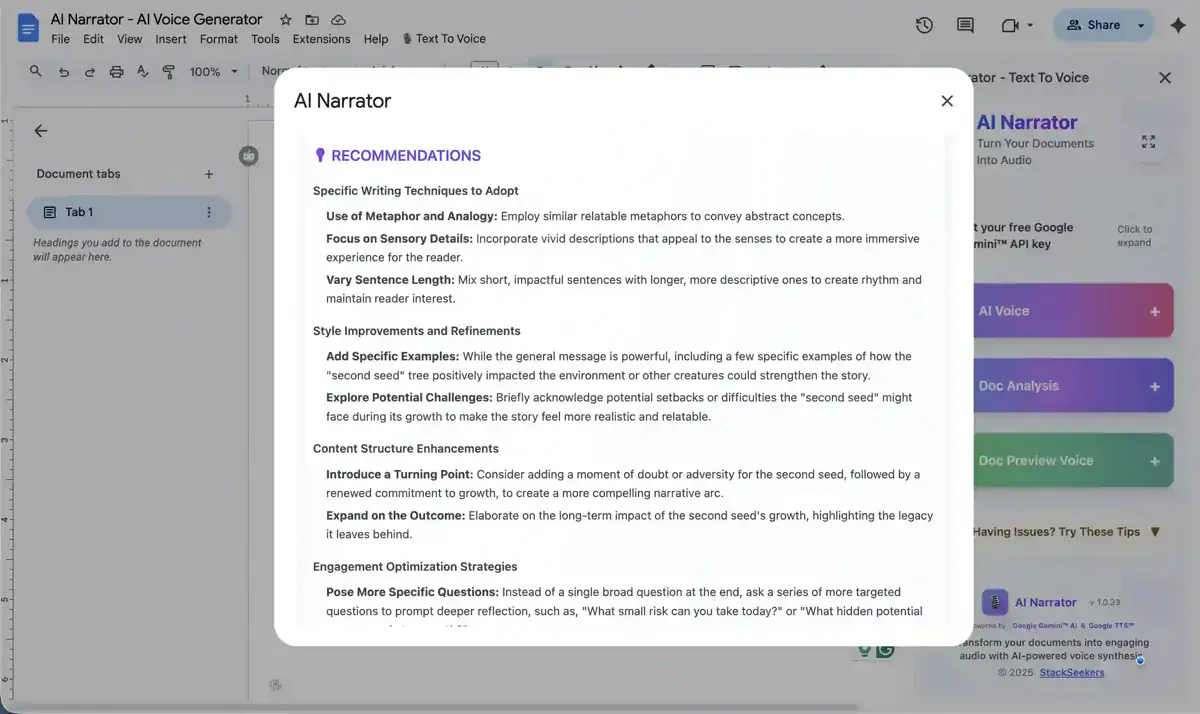
Transform your documents with intelligent AI analysis. Get comprehensive insights, engagement metrics, and personalized recommendations to enhance your content.AI-powered document insights and recommendations
Determine the nature of your text — from vlogs to technical manuals — to select the optimal AI processing model.
Define your target reader to ensure the tone, style, and language perfectly resonate with your audience.
AI-powered scanning evaluates your content structure, flow, and clarity for maximum impact.

Get actionable, specific insights and writing tips to elevate your document to a professional standard.

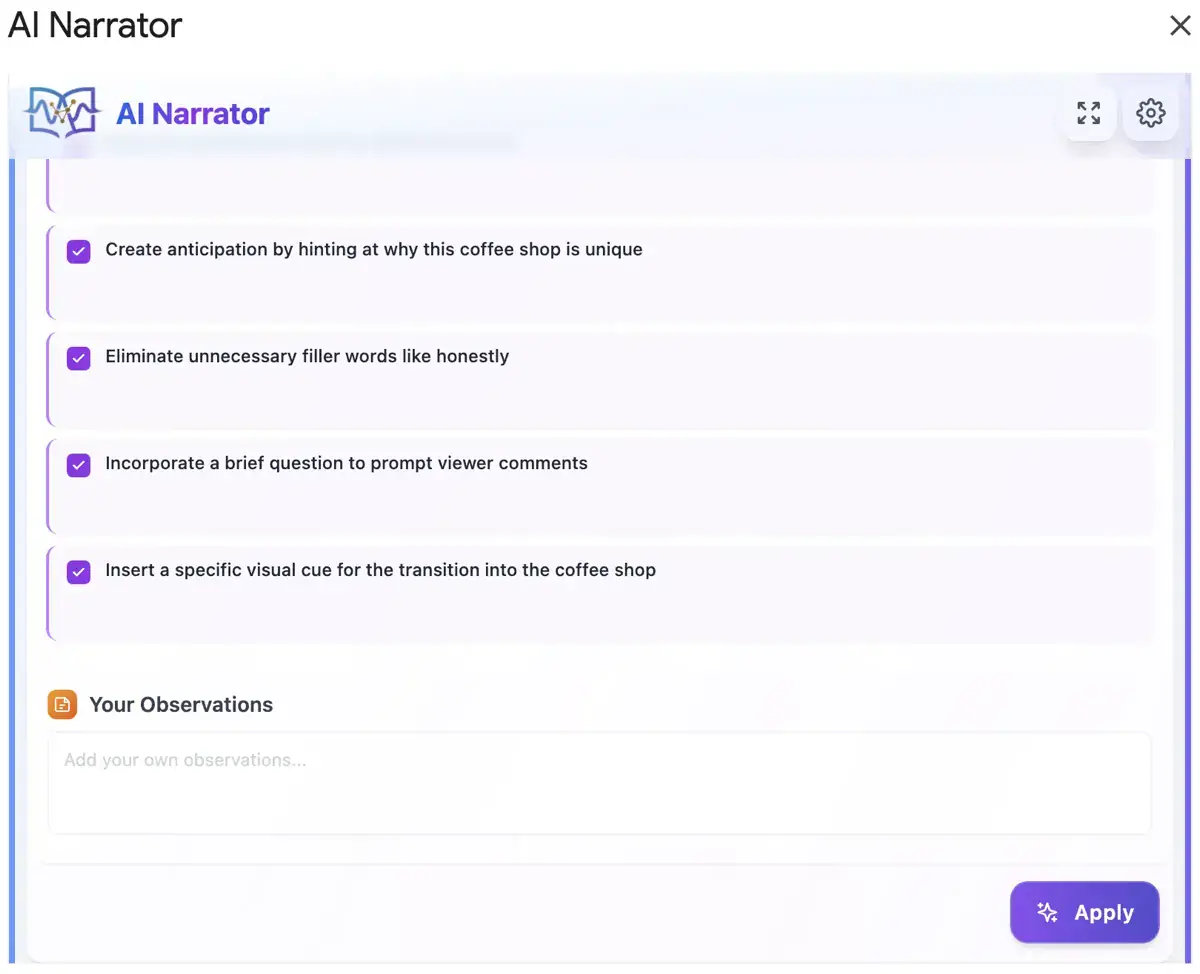
Seamlessly implement AI suggestions to refine your messaging and deliver a polished final result.

Determine the nature of your text — from vlogs to technical manuals — to select the optimal AI processing model.
Define your target reader to ensure the tone, style, and language perfectly resonate with your audience.
Get actionable, specific insights and writing tips to elevate your document to a professional standard.

AI-powered scanning evaluates your content structure, flow, and clarity for maximum impact.

Seamlessly implement AI suggestions to refine your messaging and deliver a polished final result.

What Users Are Saying
Join thousands of users who transform their Google Docs into professional audio every day.
"I tried every other TTS tool on the galactic web and they all failed. AI Narrator works beautifully. The voice presets and gender indicators make it incredibly easy to find the perfect character voice for my stories, right inside Google Docs."

Bob B.
Writer & Producer
"I found AI Narrator very useful in converting my YouTube scripts. The voice presets are outstanding and it saves me hours of recording time every week."

TechLever
Tech Reviewer
"The voices sound way more natural than I expected, especially the ones in Spanish. Dropped a Google Doc in and had an audio version ready before my coffee got cold."
Hakan
Product Hunt User
"The document analysis actually picks up on formatting cues which is a nice touch beyond just raw text-to-speech. Curious to see how it handles long reports without losing the natural pacing mid-paragraph."
Hanım U.
Product Hunt User
"Used it on a long report in Google Docs and the playback was surprisingly smooth, with voices that sound natural rather than robotic. Nice that there are enough language options to handle international docs without leaving the app."
Arda
Product Hunt User
"Finally tried this on a long report and the Spanish voice sounded way more natural than the other TTS tools I've used, instantly saved me from rereading my own draft out loud."
Melahat G.
Product Hunt User
Everything you need to know about AI Narrator
What is AI Narrator and is it free?
AI Narrator is an AI text-to-speech and AI voice generator that turns written text into natural-sounding audio using 29+ AI voices across 22+ languages. You can use it on the web, in Google Docs, through the Chrome extension, or with the Telegram bot. Start for free with no credit card required, and generate professional voice audio from your text in just a few clicks.
AI Narrator integrates directly with Google Docs as an add-on. It extracts text from your document and converts it to audio using either browser Text-to-Speech (free) or advanced AI voices powered by Google's Gemini API. Simply install the add-on, open the sidebar, and click to generate audio. The same narration engine also powers our Chrome extension, Telegram bot, Canva app, and web workspace.
Yes! AI Narrator offers a free plan that includes 5 AI voice generations and 5 document analyses per month, browser Text-to-Speech, full document reading, selected text processing, and speech controls. The free plan is perfect for trying out the service and basic text-to-speech needs. Upgrade to Pro for higher limits and voice cloning at any time.
No. AI Narrator manages speech generation on our platform, so you do not need to bring your own API key. Browser Text-to-Speech needs no key at all, and our AI voices run through our own infrastructure. This keeps setup simple and secure.
Yes! Pro subscribers can download high-quality audio files and save them directly to their Google Drive in an "AI Narrator" folder. You can use these files for any purpose, including video editing, podcasts, and presentations.
AI Narrator can process documents up to 15 MB for text extraction and up to 10,000 characters for AI voice generation. For larger documents, you can process selected sections. The system intelligently handles complex structures including tables, lists, and formatting.
The audio in this video was generated using AI Narrator!
Note: The add-on interface might have changed a little.
Get your free copy and start creating audio in 2 minutes
Audio is generated by AI. Verify facts in the original source.